The best design MCP servers for Claude Code, Cursor and Codex (2026)
Fifteen MCP servers that help a coding agent design: real references, design files, components and a browser to check the result, scored by the same seven rules.
The short answer
For real website references,  regards, fewer and better: 3,060+ sections from 330+ sites picked by hand for their look, which your agent searches by look in plain words and sees as screenshots. For app screens and flows, Mobbin, or Refero. Free and with no account, One Page Love and SiteInspire. For your design files, Figma’s server; for components, shadcn’s; to check what your agent made, Playwright or Chrome DevTools. Each is scored by the same seven rules, so read the column that matters for your job.
Disclaimer: we make regards, and it’s our pick for real website references: better ones, not more of them, from
sites picked by hand for their look and cut into sections your agent searches by how they look. Every server here,
ours included, is scored by the same seven rules below, with the reason for every score printed under it. Scored the
same way as the rest, regards totals 31 of 35, but the total is the least useful number here: read
the column that matters for your job. The same rules still cost it points: it needs an account, your agent sees a
section’s picture when it asks rather than with every result, and the server isn’t open source.
Every fact about another server comes from its own pages, docs or code, checked on 21 October 2026; ours were checked
again on 27 October 2026.
A coding agent asked to design a page with nothing to look at makes the page it has seen most often. An MCP server gives it something to look at, or to work in. The design ones do four jobs: show it real references, so it knows what good looks like for this brief; open your design files; hand it components; and let it check the page it made. Most setups want one of each, so the ranking comes twice: once by score, then by job.
How did we score them?
Seven criteria, 1 to 5 each, 35 at most. A 5 means:
- Real work: what your agent works from is real: sites or screens picked by people, your own files, or your page as it renders.
- Pictures: every result comes back as an image your agent can see.
- Finding: your agent can search in plain words, by meaning or by look.
- Setup: an address and a sign-in in the browser, or none: nothing to paste, run or keep open.
- Clients: setup written out for Claude Code, Cursor and Codex.
- Cost: free, with no account.
- Open: the server is open source.
The total weighs all seven the same, and servers that do different jobs don’t compete for the same place in your setup: a browser can’t search for references, and a library of references can’t check your page. Read the columns you care about, then the picks by job under the table.
How do they score?
| Site | Real work | Pictures | Finding | Setup | Clients | Cost | Open | Total of 35 |
|---|---|---|---|---|---|---|---|---|
| 1regards | 5 | 4 | 5 | 5 | 5 | 4 | 3 | 31 |
| 2Mobbin | 4 | 5 | 5 | 5 | 5 | 3 | 3 | 30 |
| 3A1 | 5 | 3 | 4 | 5 | 5 | 4 | 3 | 29 |
| 3Chrome DevTools | 5 | 4 | 1 | 4 | 5 | 5 | 5 | 29 |
| 3Playwright | 5 | 4 | 1 | 4 | 5 | 5 | 5 | 29 |
| 6Refero | 4 | 4 | 4 | 5 | 5 | 3 | 3 | 28 |
| 7One Page Love | 5 | 5 | 3 | 5 | 3 | 5 | 1 | 27 |
| 8Curated | 5 | 4 | 3 | 5 | 5 | 3 | 1 | 26 |
| 8Figma | 5 | 4 | 3 | 5 | 5 | 3 | 1 | 26 |
| 8Landingfolio | 5 | 3 | 3 | 3 | 5 | 4 | 3 | 26 |
| 8shadcn | 3 | 1 | 3 | 4 | 5 | 5 | 5 | 26 |
| 12Savee | 4 | 4 | 3 | 5 | 5 | 3 | 1 | 25 |
| 13SiteInspire | 5 | 3 | 3 | 5 | 1 | 5 | 1 | 23 |
| 1421st.dev | 3 | 1 | 3 | 3 | 5 | 4 | 3 | 22 |
| 14Paper | 5 | 4 | 1 | 2 | 5 | 4 | 1 | 22 |
regards by the same rules, and again on 27 October. The reason for every score is under each server below.Which is best for what?
| Pick | Also good | |
|---|---|---|
| Real website references, searched by look | regards | One Page Love, free; Curated, with each site’s design.md |
| App screens and flows | Mobbin | Refero, with a lifetime plan |
| Free references, with no account | One Page Love | SiteInspire |
| Sections with their fonts and colours | A1 | Curated |
| A moodboard your agent can add to | Savee | Are.na |
| Motion and small details | Details | Mobbin, for app flows |
| Your design files, into code and back | Figma | Paper, on its own canvas |
| Components for your project | shadcn | 21st.dev, with generation on credits |
| Checking what your agent made | Playwright | Chrome DevTools, for performance |
Which MCP servers show your agent real references?
More than a dozen libraries of design references run an MCP server now. They differ in what they keep, websites, app screens or saved images, in whether your agent sees the pictures, and in what they cost.
regards
Best for real website sections, picked for their look, that your agent searches by look.
Fewer sites, each one worth studying. 330+ of them, picked by hand for how they look, cut into 3,060+ sections, from heroes and pricing tables to footers: studios, portfolios, fashion and editorial sites as well as products. Your agent searches them the way you’d brief a designer, in plain words, by look, by colour, by what a section says or by a site to start from, and leaves things out with “not dark”; added by its address, it can start from a picture too. Its searches are Deep unless it asks for a quick one: a closer look that puts the best first. It sees any section as a screenshot, reads the whole page around it, finds more like the ones it keeps, and saves the ones you pick to your boards. Adding it takes its address and a click on Allow, with nothing to paste, and the steps for each agent are one page. Agents come with every plan, Free included: on Free your agent shares your 10 searches a day, and Pro is $20 a month or $200 a year. The design skill that makes your agent research first is open source. The catch: fewer sites than most here, by choice, and websites, not app screens.
- Real work
- 5Websites picked by hand for their look
- Pictures
- 4Any section as an image, on request
- Finding
- 5A look in words, colours or a picture; lookalikes
- Setup
- 5An address; you sign in and click Allow
- Clients
- 5Claude Code, Cursor, Codex and more
- Cost
- 4Free, 10 a day, with an account; Pro $20
- Open
- 3The design skill is MIT; the server isn’t
- Total
- 31of 35
Ask your agent for a features section that isn’t a row of icon cards, and this is what it gets back to look at, before it writes a line:
regards features section set like a magazine spread: big photographs and text in columns, not a row of icon cards 

Photographs of different sizes set off-centre down the page, a few lines of caption beside each, like a picture story in a magazine.
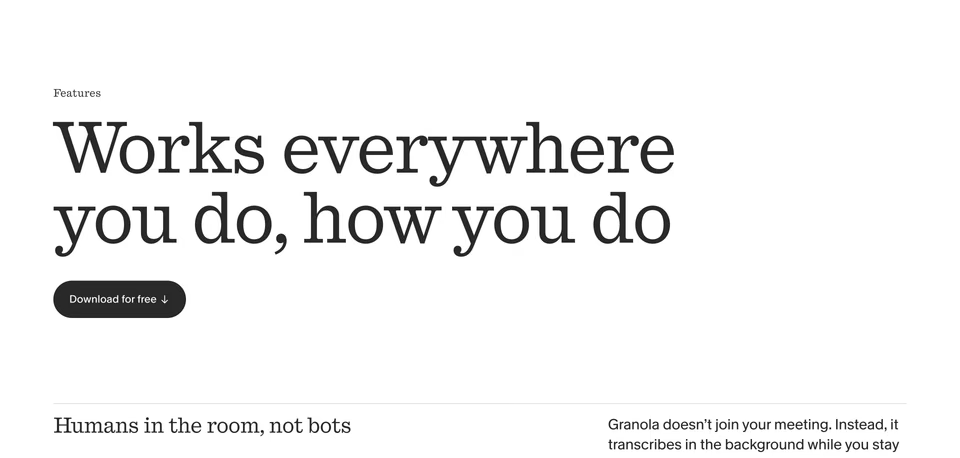
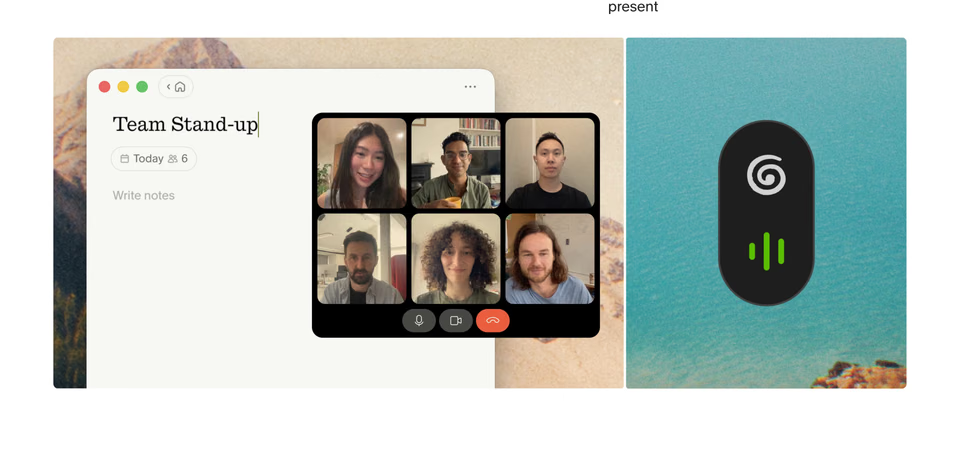
A serif headline, then each feature as a row: its name on the left, a sentence on the right, the product shown on painted landscapes below.
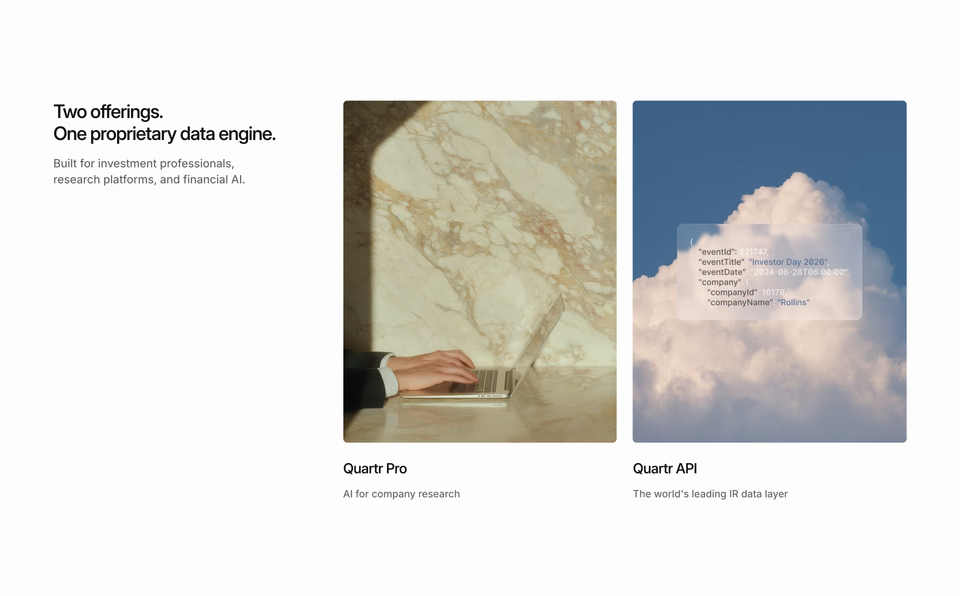
Two products as two tall photographs, a hand on marble and a cloud, a two-line headline beside them and not one icon.
Mobbin
mobbin.com Its page on regards Alternatives
Best for app screens and flows, and website sections, with a picture for every result.
Over 600,000 screens from iOS and web apps, their flows, and website sections, searched in plain words, with a deeper
mode for screens. Every result comes back with a preview image sized for your agent to read, and as a gallery in the
clients that show apps. The MCP server comes with Pro, $10 a month billed yearly or $15 billed quarterly, and Team;
its tools read and never write. The catch: no MCP on Free, and no plan billed month to month. We compared the two in regards vs Mobbin.
- Real work
- 4Every screen of the apps it covers
- Pictures
- 5A preview image with every result
- Finding
- 5Plain words, with a deep mode
- Setup
- 5An address and a sign-in
- Clients
- 5Claude Code, Cursor, Codex and more
- Cost
- 3On Pro, $10 a month billed yearly
- Open
- 3Its skills are MIT; the server isn’t
- Total
- 30of 35
Refero
refero.design Its page on regards
Best for product screens, flows and style guides, with a lifetime plan.
145,000+ screens from 400+ web and iOS products, with their flows and style guides: colour roles, type scales, what to
do and what not to. Your agent searches by words, finds screens like one it has, and pulls any screen as an image.
Pro is $17 a month, or $10 a month billed yearly, and there’s a $250 lifetime plan; each user gets up to 8,000 tool
calls a month. Refero Skill, MIT, makes the research a step. The catch: no MCP on Free, which shows about 3% of the
library. More in regards vs Refero.
- Real work
- 4Products picked, then every screen kept
- Pictures
- 4Any screen as an image, on request
- Finding
- 4Words, styles, similar screens
- Setup
- 5An address and a sign-in, or a token
- Clients
- 5Claude Code, Cursor, Codex and more
- Cost
- 3On Pro, $10 a month yearly; $250 for life
- Open
- 3Refero Skill is MIT; the server isn’t
- Total
- 28of 35
A1
a1.gallery Its page on regards
Best for website sections with their fonts and colours measured, free to start.
1,000+ websites reviewed by hand, cut into sections and whole pages, each with the fonts, colours and sizes measured from the page. Seventeen read-only tools search sites, sections and the words on them, filter by style, font, technology and colour, find similar sites and pair fonts. A free account gets 50 requests a day; Pro, $9 a month or $72 a year, gets 2,000. The catch: you search by words and filters, not by describing a look.
- Real work
- 5Websites reviewed by hand
- Pictures
- 3Screenshots; as links or images, not stated
- Finding
- 4Words, filters, fonts, colours, lookalikes
- Setup
- 5An address and a free account
- Clients
- 5Claude Code, Cursor, Codex and more
- Cost
- 4Free, 50 requests a day; Pro $6 a month yearly
- Open
- 3Its plugin and skills are MIT
- Total
- 29of 35
One Page Love
onepagelove.com Its page on regards Alternatives
Best for free references with screenshots, no account or key.
One-page websites and their sections, picked by hand since 2008, searched by words with filters for colour, genre, platform, style, technology and typeface. Every result includes a screenshot, so your agent sees them at once. Free, with no key or sign-in, during its private beta. The catch: one-page sites, and written steps for Claude Code and Claude.ai; other clients take its address as it is.
- Real work
- 5One-page sites, picked by hand since 2008
- Pictures
- 5Screenshots come back with the results
- Finding
- 3Words, with colour, style and typeface filters
- Setup
- 5An address; no key, no sign-in
- Clients
- 3Claude Code; others by a generic config
- Cost
- 5Free, during its private beta
- Open
- 1Closed
- Total
- 27of 35
Curated
curated.design Its page on regards
Best for sections with each site’s design system, ready for code.
3,322 sections from live websites, and for each site a design.md: its colours, type and spacing, as markdown, Tailwind, CSS variables or JSON. A person checks every site that goes in. Your agent searches sections by words, filtered by kind, and opens any one at full size as an image. Pro, $9 a month or $84 a year, includes the MCP server and a REST API. The catch: the server needs Pro; without it, two of its eight tools work.
- Real work
- 5A person checks every site
- Pictures
- 4Any section as an image, on request
- Finding
- 3Words, filtered by kind of section
- Setup
- 5An address and a sign-in, or a key
- Clients
- 5Claude Code, Cursor, Codex, OpenCode
- Cost
- 3On Pro, $9 a month or $84 a year
- Open
- 1Closed
- Total
- 26of 35
Landingfolio
landingfolio.com Its page on regards
Best for sections and whole pages on a free token, with skills to match.
4,600+ sections from 961 sites, whole pages and link-preview images, curated by its team. Your agent searches and picks sections and can keep a collection of its own. A free account’s token gives 20 fetches a day; $49 a year, or $59 once, gives 1,000. Seven free skills, MIT, come with it. The catch: a token to paste, and screenshots arrive as links your agent has to open.
- Real work
- 5Sections curated by its team
- Pictures
- 3Screenshot links to open
- Finding
- 3Search, by kind of section
- Setup
- 3A token from your dashboard to paste
- Clients
- 5Claude Code, Cursor, Codex and more
- Cost
- 4Free, 20 a day; $49 a year for 1,000
- Open
- 3Seven MIT skills; the server isn’t
- Total
- 26of 35
Savee
Best for a moodboard your agent can search and add to.
6M+ design references and your own boards. Your agent searches the library by words, sees any save as an image when it asks, and, if you allow it, saves to your boards; it can never delete. Every paid plan includes the server: Pro is $12 a month, or $9 a month billed yearly. The catch: a reference is an image cut away from its page, and searches stop at 200 a week.
- Real work
- 4Real work, saved by its members
- Pictures
- 4Any save as an image, on request
- Finding
- 3Full-text search of the library
- Setup
- 5An address and a sign-in
- Clients
- 5Claude Code, Cursor, Codex and more
- Cost
- 3Every paid plan; Pro $9 a month yearly
- Open
- 1Closed
- Total
- 25of 35
SiteInspire
siteinspire.com Its page on regards Alternatives
Best for a free, hand-picked archive, with no account.
Over 10,000 websites picked by hand since 2008, filed by style, type, subject and platform. Its read-only server needs no account: your agent searches the text and categories and gets each site with a link to its screenshot. Free. The catch: the address is in its llms.txt, with no steps for any client, and pictures come as links.
- Real work
- 5Over 10,000 sites, picked by hand
- Pictures
- 3A screenshot link with each site
- Finding
- 3Text search and categories
- Setup
- 5An address; no sign-in
- Clients
- 1No setup steps for any client
- Cost
- 5Free, no account
- Open
- 1Closed
- Total
- 23of 35
More reference servers, not scored here: Details, 3,373 hand-curated website details, motion shown as seven frames in order, from $9 a month billed yearly; Landing Gallery, 500+ hand-picked sites, free with no account; MaxiBestOf, websites and sections on Pro; Nicely Done, over 200,000 SaaS screens on its paid plans; ScreensDesign, top-grossing iOS apps with revenue estimates, on Pro; and Are.na, which reads and adds to your channels with an Are.na account.
Which MCP servers work on your design files?
Figma
Best for your own designs, read into code and written back.
Figma’s server reads a frame from its link: code for it (React and Tailwind unless you ask for another), its variables and a screenshot your agent can see; it searches your design libraries too. The remote server also writes to the canvas: it creates and edits layers, turns a live page into layers and starts new files. Every plan can connect, with a few tool calls a month on Starter or a View or Collab seat; a Dev seat on Professional is $12 a month billed yearly. Writing is in beta, free for now, on paid plans. The catch: it reads what you have designed, so it helps once there’s a file.
- Real work
- 5Your own design files
- Pictures
- 4A screenshot of any frame, on request
- Finding
- 3Searches your design libraries
- Setup
- 5An address and a sign-in
- Clients
- 5Claude Code, Cursor, Codex and more
- Cost
- 3A few calls a month free; a Dev seat from $12
- Open
- 1Closed
- Total
- 26of 35
Paper
paper.design Its page on regards
Best for a canvas your agent can design on.
A design tool whose server works on the file open in Paper Desktop: your agent reads its layers, styles and screenshots, adds HTML to the canvas as layers, edits styles and text, and exports JSX. Free gets 100 tool calls a week; Pro is $20 per editor a month, or $16 billed yearly, with a million a week. The catch: Paper Desktop has to be open, with the file in it.
- Real work
- 5Your own design files
- Pictures
- 4Screenshots of what’s on the canvas
- Finding
- 1Works on the file you have open
- Setup
- 2Paper Desktop must be open
- Clients
- 5Claude Code, Cursor, Codex and more
- Cost
- 4100 calls a week free; Pro $16 a month yearly
- Open
- 1Closed
- Total
- 22of 35
Also on your files: Webflow’s server edits a site’s elements, styles, components and CMS and publishes it, on every site plan, the free one included; Penpot’s is open source and reads and changes anything in a file, with the file open in a browser tab; and Subframe’s designs pages and components and screenshots them. Framer’s agents need no MCP server: they work through a command line and skills.
Which MCP servers give your agent components?
shadcn
Best for the components in the registries your project uses.
The shadcn command line runs a server on your machine that lists, searches and shows the components in your project’s registries, with their examples, and hands your agent the command to add them. Registries such as Aceternity’s plug into it. One command sets it up for Claude Code, Cursor and others; Codex also wants a line in its config. Free and MIT. The catch: code and text, so your agent never sees a component.
- Real work
- 3Components from the registries you use
- Pictures
- 1Code and text
- Finding
- 3Searches your registries
- Setup
- 4One command; runs on your machine
- Clients
- 5Claude Code, Cursor, Codex and more
- Cost
- 5Free
- Open
- 5MIT
- Total
- 26of 35
21st.dev
Best for community components, and new ones generated on credits.
Once Magic MCP, now a hosted server that searches 21st.dev’s components, themes and templates, fetches their code, and with AI access generates new ones and works on them with you. A free key covers search, with two installs a day; paid plans start at $6 a month billed yearly, and generating needs AI credits, from $15 a month. The catch: a key to paste, and keys from the old Magic server were reset.
- Real work
- 3Community components; AI on credits
- Pictures
- 1Code and text; images not stated
- Finding
- 3Searches components, themes, templates
- Setup
- 3An API key to paste
- Clients
- 5Claude Code, Cursor, Codex and more
- Cost
- 4Search free, two installs a day
- Open
- 3Its client is ISC; the server is hosted
- Total
- 22of 35
Also for components: Magic UI’s server, free and MIT, and Storybook’s, in preview, which shows your agent your own stories and runs their tests.
Which MCP servers check the result?
Playwright
Best for opening the page your agent made and using it like a person.
Microsoft’s server drives a browser for your agent: open the page, click, type, fill forms, read the console and the network, and take screenshots. It reads a page as an accessibility snapshot first, and screenshots when asked. One command adds it to Claude Code, Codex, Cursor and more. Free, Apache 2.0. The catch: the browser opens in a window unless you ask for it headless, and its README now points coding agents to Playwright’s command line and skills, which use fewer tokens.
- Real work
- 5Your page, as it renders
- Pictures
- 4Screenshots on request
- Finding
- 1You give it the address
- Setup
- 4One command; runs on your machine
- Clients
- 5Claude Code, Cursor, Codex and more
- Cost
- 5Free
- Open
- 5Apache 2.0
- Total
- 29of 35
Chrome DevTools
Best for how the page performs, and what it really does.
Google’s server drives Chrome: screenshots and accessibility snapshots, the CSS of any element, the console and the network, performance traces with what they found, and a Lighthouse audit for accessibility, SEO and best practices. One command adds it to Claude Code, Codex, Cursor and more. Free, Apache 2.0. The catch: it sends usage statistics to Google unless you turn them off, and Chrome opens in a window by default.
- Real work
- 5Your page, as it renders, with its timings
- Pictures
- 4Screenshots on request
- Finding
- 1You give it the address
- Setup
- 4One command; runs on your machine
- Clients
- 5Claude Code, Cursor, Codex and more
- Cost
- 5Free
- Open
- 5Apache 2.0
- Total
- 29of 35
How do you add a design MCP server to Claude Code, Cursor or Codex?
Most are an address. In Claude Code, claude mcp add --transport http with a name and the address, then /mcp to sign in. In Codex, codex mcp add with a name and --url. In Cursor, the
address goes in ~/.cursor/mcp.json, or an install link does it for you. Servers that run on your machine,
like Playwright and shadcn, are an npx command in the same places. The steps for regards in each
agent, Claude, Cursor, Codex, Grok and Figma’s among them, are on MCP for agents.
Then ask for references before the design, not after. A setup that works: one library of references for what good looks like, your design files if you have them, your components, and a browser to look at the result. The design skill makes the first step a habit:
Which design MCP servers are free?
- Free, with no account: One Page Love (during its beta) and SiteInspire for references, Landing Gallery too; shadcn, Playwright and Chrome DevTools on your machine.
- Free with an account, up to a limit: A1 (50 requests a day), Landingfolio (20 a day), Paper (100
calls a week), Figma (a few calls a month on Starter), 21st.dev’s search, and regards (10
searches a day).
- On paid plans: Mobbin, Refero, Savee, Curated, Details, MaxiBestOf, Nicely Done and ScreensDesign.
Try them side by side
Give your agent the same brief with two of these connected, and keep the one whose references you’d use. To look for
yourself first, search regards by look, browse the sections we
picked, from heroes to features, or the styles, and see every plan side by side. For galleries rather than
servers, we scored the best web design inspiration sites and listed
the best Mobbin alternatives.
Sources, checked 21 October 2026: Mobbin’s MCP, MCP features, setup and pricing; Refero’s MCP, getting started, tools and pricing; A1’s MCP, pricing and llms.txt; One Page Love’s MCP; Curated’s MCP, sections and pricing; Landingfolio’s MCP, pricing and skills; Savee’s MCP, setup, permissions and pricing; SiteInspire’s llms.txt; Details’ MCP and pricing; Landing Gallery’s MCP; MaxiBestOf’s Pro; Nicely Done’s MCP; ScreensDesign’s MCP; Are.na’s MCP; Figma’s MCP server, tools, limits, writing to the canvas and pricing; Paper’s MCP and pricing; Webflow’s MCP; Penpot’s MCP; Subframe’s MCP; Framer’s agents; shadcn’s MCP; 21st.dev’s MCP, repository and pricing; Magic UI’s MCP; Storybook’s MCP; Playwright’s MCP; and Chrome DevTools’ MCP.
FAQ
What is the best design MCP server?
It depends on the job. For real website references, regards: fewer, better sites, picked by hand for their look and searched by look. For app screens, Mobbin. For your design files, Figma’s. For components, shadcn’s. To check the result, Playwright. All fifteen are scored by the same seven rules, with the reason under every score.
Which design MCP servers are free?
With no account: One Page Love (during its beta), SiteInspire and Landing Gallery for references, and shadcn, Playwright and Chrome DevTools on your machine. With a free account, up to a limit: A1, Landingfolio, Paper, Figma, 21st.dev’s search, and regards (10 searches a day). Mobbin, Refero, Savee and Curated are on paid plans.
How do I add a design MCP server to Claude Code?
Run claude mcp add --transport http with a name and the server’s address, then /mcp in Claude Code to sign in. Codex takes codex mcp add with --url, and Cursor the address in its mcp.json. Servers that run on your machine, like Playwright, are an npx command instead.
Does Figma have an MCP server?
Yes. Figma’s server reads a frame from its link: code for it, its variables and a screenshot. Its remote server also writes to the canvas, in beta on paid plans. Every plan can connect, with a few tool calls a month on Starter.