Website inspiration for Claude Code, Cursor and Codex: references, setup and prompts
Your agent designs from what it’s shown. Four ways to show it real websites, how to connect each agent, and prompts that brief it like a designer.
The short answer
Give your coding agent real references, not adjectives, and a few good ones rather than many. Paste screenshots of sections you like: Claude Code, Cursor and Codex all take images, free. Link a Figma frame through Figma’s MCP server when the design exists. Or connect an MCP server that finds references itself:  regards’ lets your agent search 3,060+ sections from 330+ hand-picked sites by look; it comes with every plan, Free included, and its free design skill researches each brief there before the agent designs.
Ask a coding agent for a beautiful website and you get its idea of one, which is everyone’s. It designs from what it’s shown, so the most useful thing you can do is show it something: real sections from real sites, with a line on what to take from each.
This is how, in Claude Code, Cursor and Codex, from the free ways to the ones that search for you, then how to connect regards, and prompts to start from. If your site already looks generic, start with how to make a website look less vibe coded.
How do you give a coding agent visual references?
Four ways, and each has its place.
Paste screenshots
It works, and it’s free. All three agents take images. In Claude Code, drag one into the window, paste it with Ctrl+V
(Cmd+V in iTerm2, Alt+V on Windows), or give it the file’s path. In Cursor, drag or paste it into the chat. In Codex,
paste it into the composer, or pass it on the command line with codex -i. Crop to the section you mean
rather than the whole page, and say what to take from it.
The catch: you find the references yourself, and a screenshot is only pixels. Your agent can’t see what moves, how the page reads on a phone, or what sits above and below.
Give it a URL
An agent can fetch a page, but on its own it reads it as text. Claude Code’s web fetch turns the page into Markdown, reads it for what your agent asked, and passes back the answer rather than the page, so your agent learns the words and the structure, not the look. To see a page, it needs a browser: Cursor’s agent has a browser of its own that takes screenshots, and Playwright’s MCP server can take one too, though it works from the page’s accessibility tree by default.
Point it at Figma
If the look already exists in Figma, Figma’s MCP server hands Claude Code, Cursor, Codex and other agents the design itself: the variables, components and layout of a frame you link. Its remote server works on every Figma plan, Starter included, and how many calls you get depends on your seat. It’s the right tool when you have a design to follow. It won’t find you one.
Connect an MCP server that returns references
Your agent searches a library of real design itself, in the middle of a task, and looks at what it finds. One Page
Love’s server is free during its beta and needs no key, and SiteInspire’s is public and needs no sign-in. Mobbin’s
comes with its paid plans, for app screens and flows, and Refero’s with Pro, Team or Lifetime. regards’ searches
3,060+ sections of 330+ websites by how they look, each site picked by hand for its look, and comes with
every plan, Free included. Its searches are Deep unless your agent asks for a quick one: a closer look that puts the best
first.
| What your agent gets | Cost | |
|---|---|---|
| Screenshots | The pixels you picked, and nothing around them | Free |
| A URL | The words and structure; the look only with a browser tool | Free |
| Figma | Your own design: variables, components, layout | Every Figma plan; calls depend on your seat |
| An MCP library | Real references it finds and looks at itself | One Page Love and SiteInspire free; Mobbin and Refero on paid plans; regards on every plan, Free included |
How do you set up regards in Claude Code, Cursor and Codex?
Add the MCP server once, then sign in: your agent opens regards.design and you click Allow, with no key to paste.
Agents come with every plan, Free included, and search on your plan as you do on the site: on Free, your agent shares your
10 searches a day.
Claude Code
claude mcp add --transport http regards https://mcp.regards.design/mcpThen run /mcp in Claude Code and pick regards to sign in.
For Claude Desktop, claude.ai and the phone apps, Add to Claude on the agents page adds it as a connector in one click.
Cursor
Add to Cursor, on the agents page, installs it in one click. Or add it to your config:
{
  "mcpServers": {
    "regards": {
      "url": "https://mcp.regards.design/mcp"
    }
  }
}
Then click Connect beside regards in Settings → Tools & MCP, and Allow.
Codex
codex mcp add regards --url https://mcp.regards.design/mcpCodex opens regards.design to sign in. If it doesn’t, run codex mcp login regards.
The Codex app, CLI and IDE extension share one setup, so this connects all three.
Add the design skill
The MCP server lets your agent search. The design skill makes it a habit: before your agent designs a page, it searches for sections that fit the brief, keeps five to eight, says what it takes from each, and sets the page’s direction from them. It’s free and open source, for Claude Code, Codex, Cursor and other agents that read skills, and it searches through the MCP server, so connect that first.
npx skills add filipwojda/regards-skillWhat should you ask for?
Brief your agent the way you’d brief a designer: the kind of section, what it shows, the type, the colour, how dense, and what to leave out. Ask for references before code, and for a line on what it takes from each. Four prompts to start from:
Here is the search behind the pricing prompt, run on regards the way an agent runs it, and what it found:
regards pricing as plain ruled rows instead of cards, the price large and right-aligned 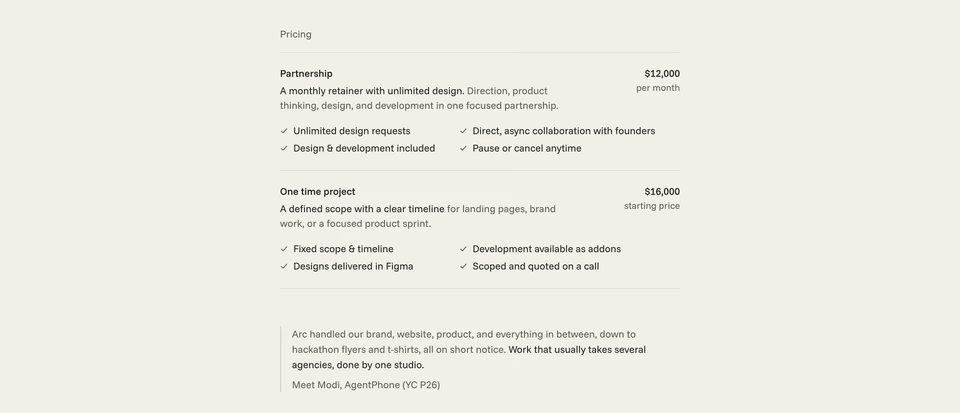
Take the rows: a name, one line and the price on the right, ticks in two columns, a hairline between plans, and a quote with a rule beside it.
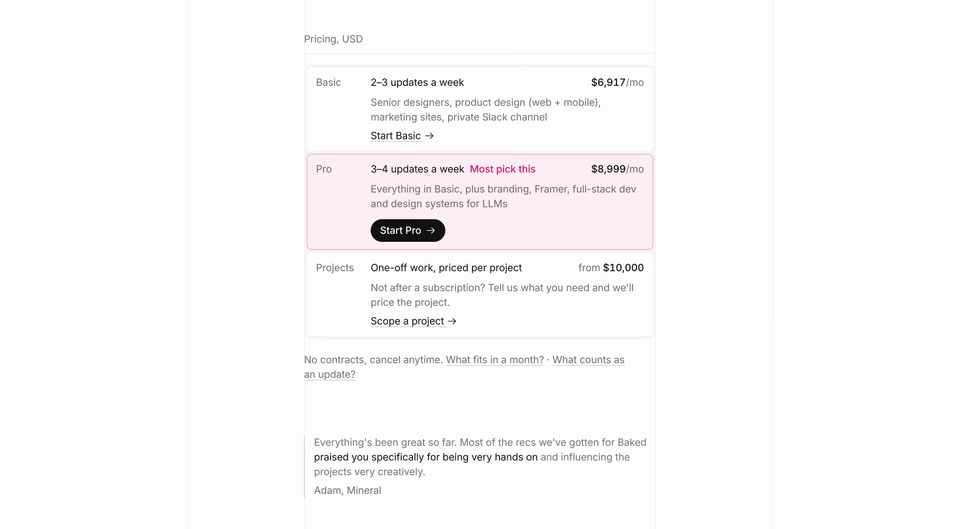
Take the tint: the plan most people pick is one row filled with a pale accent, rather than a raised card with a badge.
And the one behind the hero:
regards hero that feels like a technical manual: a drafting grid, small monospace labels, one drawing of the product 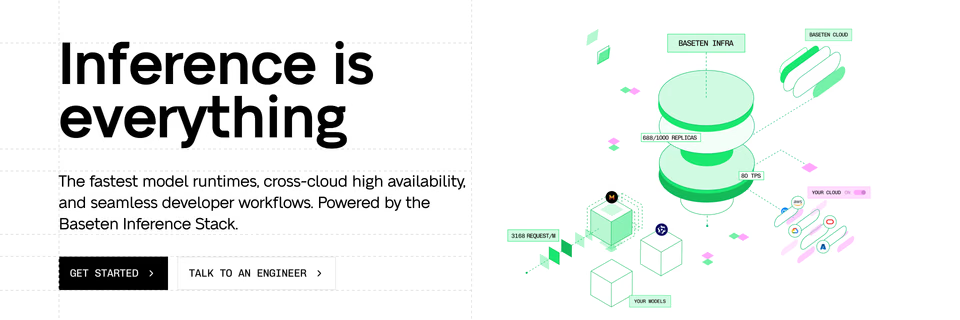
Take the construction lines: a dashed grid behind the headline, and the product drawn in isometric line art with small monospace tags.
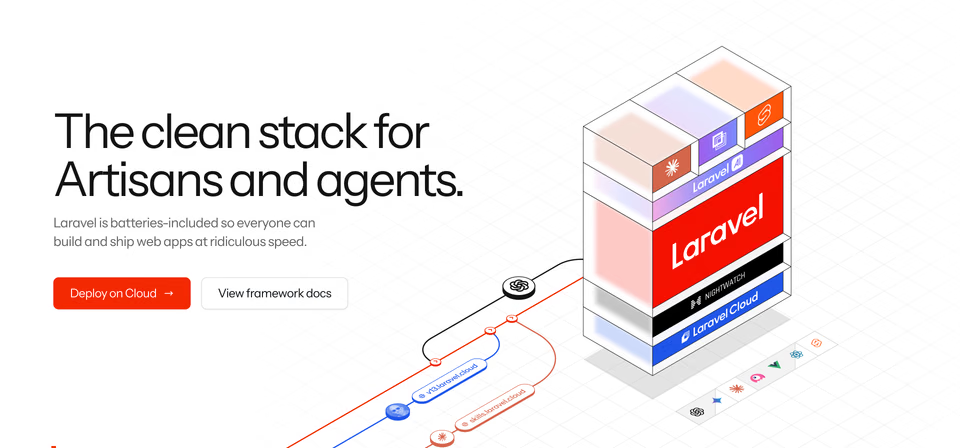
Take the drawing: the product as a stack of coloured layers in a wireframe box, with lines running into it like a transit map.

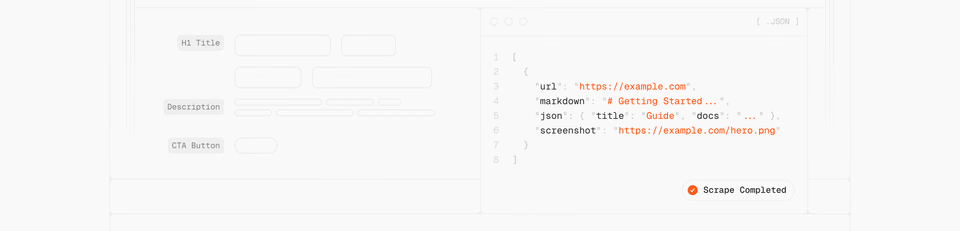
Take the corners: bracketed monospace labels pinned to a faint tile grid, and a little landscape of text characters on either side.
That’s what a good reference looks like: a whole section from a real site, specific enough that you can name the idea you’re taking. A few like these do more than a folder of fifty: what helps is better references, not more of them. Ask your agent to name the idea too, and it designs from it instead of copying the page.
Where should you start?
For free: crop three screenshots of sections you like, paste them in with the first prompt above, and compare what
comes back with them. To find those sections by look, search regards, free for
10 searches a day, or browse the sections we picked by hand. To let
your agent search for itself, connect it and add the design skill; every plan
is on the pricing page. For more places to look, see the best web design inspiration sites, compared.
Sources, checked 21 October 2026: Claude Code’s common workflows, interactive mode and tools reference; Cursor’s prompting and browser docs; Codex’s image inputs and CLI reference; Playwright MCP’s README; Figma’s guide to its MCP server and rate limits; One Page Love’s MCP; SiteInspire’s llms.txt; Mobbin’s MCP and pricing; Refero’s llms.txt and MCP docs; and the skills CLI.
FAQ
Can Claude design a good-looking website?
Yes, given a direction. Left alone, it reaches for the safest, most common choices; given real references and a few decisions about type, colour and layout, it designs from those. Screenshots of sections you like are the quickest way to give it one.
How do I give Claude Code a screenshot?
Drag the image into Claude Code, paste it with Ctrl+V (Cmd+V in iTerm2, Alt+V on Windows), or give it the image’s path. Cursor takes images dragged or pasted into its chat, and Codex takes them pasted into its composer or passed with codex -i.
What makes a good website design prompt?
Brief it the way you’d brief a designer: the kind of section, what it shows, the type, the colour, how dense, and what to leave out. Then ask for references before code, and for a line on what it takes from each. For example: pricing as two plain ruled rows, not cards, the price large and on the right, one customer quote under it.
Is there an MCP server for website design inspiration?
Several. One Page Love’s is free during its beta and needs no key, and SiteInspire’s is public and needs no sign-in. Mobbin’s comes with its paid plans, for app screens and flows, and Refero’s with Pro, Team or Lifetime. regards’ comes with every plan, Free included, and searches sections of hand-picked websites by how they look.