The best website section libraries in 2026, compared
Libraries that cut real websites into heroes, pricing tables and footers you can search, scored by the same seven rules: what gets in, how many, how you find them, what you can take away, what’s free and whether your agent can use it.
The short answer
To find sections by describing how they should look,  regards: 3,060+ sections from 330+ sites picked by hand for their look, searched in plain words by you or your coding agent, each opening inside its page. Better inspiration, not more of it. For a free library with no account and an open MCP server, Design Details, which comes top by score, or One Page Love. For fonts and colours measured with each section, A1; for landing pages, studios and portfolios with their design systems and motion measured, Arche. For the most sections, Land-book and save.design. For SaaS sections with nothing to sign up for, UI Sections; for sections scored for conversion, Web Anatomy. To copy a section into Figma, Mobbin on its paid plans, or Land-book.
Disclaimer: we make regards. regards.design is a search engine for website sections, searchable by look:
3,060+ sections from 330+ sites, every site picked by hand for how it looks, that you or your coding agent
search by describing what you want. It’s the right pick when you know which part of a page you’re designing and want
to find real ones by how they look; better inspiration, not more of it. When you want the most sections, code or a
Figma copy to start from, or a library that’s free with no account, one of the others below fits better, and we say
which.
Every library here, ours included, is scored by the same seven rules, with the reason for every score printed under
it. Scored that way, regards totals 29 of 35: it loses points for its size, for having nothing to
download or copy, and for asking you to sign in. Every fact about another library comes from its own pages, read on
9 November 2026.
A section library cuts real websites into their parts, heroes, pricing tables, testimonials, footers, and keeps each one as a result of its own. That’s the shape for designing one part of a page at a time: you compare twelve pricing tables, not twelve pages that each hold one. Galleries of whole sites are a different job, compared in the best web design inspiration sites.
How did we score them?
Seven criteria, 1 to 5 each, 35 at most. A 5 means:
- Picked: a person picks every site that goes in, and the library says so.
- Size: 10,000 sections or more, as the library states them on the day (5,000 is a 4, 3,000 a 3).
- Search: you describe what you want in plain words and it’s read for meaning or look, not matched to tags.
- In context: each section opens inside the page it came from, with the live site a click away.
- Take away: you can take the section into your work as code or into Figma.
- Free: the whole library, with no account.
- Agents: an MCP server your coding agent can use on the free plan.
Every library here keeps sections from real, shipped websites, so that isn’t scored. The total weighs all seven the same; read the columns that matter for your work, then the picks under the table.
How do they score?
| Site | Picked | Size | Search | In context | Take away | Free | Agents | Total of 35 |
|---|---|---|---|---|---|---|---|---|
| 1 Design Details | 5 | 2 | 5 | 5 | 4 | 5 | 5 | 31 |
| 2 A1 | 5 | 3 | 4 | 4 | 4 | 5 | 5 | 30 |
| 2 Arche | 5 | 3 | 4 | 5 | 4 | 4 | 5 | 30 |
| 4 regards | 5 | 3 | 5 | 5 | 2 | 4 | 5 | 29 |
| 5 Landingfolio | 5 | 3 | 4 | 4 | 4 | 3 | 5 | 28 |
| 6 Land-book | 5 | 5 | 4 | 4 | 5 | 3 | 1 | 27 |
| 6 Unsection | 4 | 4 | 4 | 4 | 4 | 3 | 4 | 27 |
| 8 Curated | 5 | 3 | 4 | 4 | 4 | 2 | 4 | 26 |
| 8 Mobbin | 3 | 4 | 4 | 4 | 5 | 2 | 4 | 26 |
| 8 One Page Love | 5 | 3 | 3 | 4 | 1 | 5 | 5 | 26 |
| 11 save.design | 4 | 5 | 5 | 2 | 2 | 2 | 5 | 25 |
| 12 UI Sections | 4 | 2 | 3 | 3 | 4 | 5 | 2 | 23 |
| 12 Web Anatomy | 5 | 3 | 2 | 2 | 3 | 4 | 4 | 23 |
| 14 SaaSFrame | 3 | 1 | 3 | 4 | 5 | 2 | 2 | 20 |
regards by the same rules. The reason for every score is under each library below.Which is best for what?
| Pick | Also good | |
|---|---|---|
| Sections you search by describing the look, by you or your agent | regards | Design Details; save.design |
| Free, with no account, and an MCP server open to all | Design Details | One Page Love |
| Fonts and colours measured with every section | A1 | Arche, with each site’s design system |
| Landing pages, studios and portfolios, with motion | Arche | Design Details, with recordings |
| The most sections to browse | Land-book | save.design; Unsection |
| A section into Figma | Mobbin | SaaSFrame, as editable layers |
| SaaS and startup sections, nothing to sign up for | UI Sections | Landingfolio |
| Sections scored for conversion | Web Anatomy | none we found |
| One-page websites | One Page Love | Land-book |
Which libraries keep website sections you can search?
Fourteen, checked on the same day. They differ in what gets in, how you find a section, what you see around it and what you can take away.
regards
Best for sections from sites picked for their look, found by describing the look, by you or your agent.
Fewer sites, each one worth studying: 330+ of them, picked by hand for how they look, cut into 3,060+ sections, from heroes and pricing tables to footers, across studios, portfolios, shops and editorial sites as well as products. You search them the way you’d brief a designer, in plain words, by look, by colour or by the words a section shows, or from a screenshot, and leave things out with “not dark”. Each section opens inside its page, with the live site a click away and similar sections from other sites under it. Your agent searches the same library over MCP, with every plan, Free included: Free is 10 searches a day and 5 Deep searches a month, Pro $20 a month. The catch: fewer sections than most here, by choice, and nothing to download, copy as code or send to Figma; boards keep what you save and share it by link.
- Picked
- 5Every site picked by hand for how it looks
- Size
- 33,060+ sections
- Search
- 5A look in plain words, colours or a picture
- In context
- 5Each section opens inside its page; the live site a click away
- Take away
- 2Boards to save and share; no downloads or code
- Free
- 4Free with an account, 10 searches a day
- Agents
- 5MCP on every plan, Free included
- Total
- 29of 35
Searched in plain words, by look, this is what comes back:
regards pricing as plain ruled rows, not cards, lots of white space 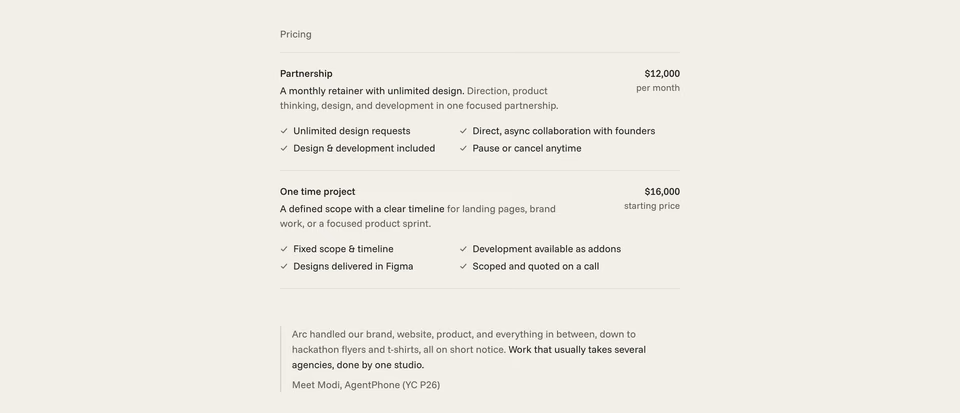
Two offers as ruled rows: a name, two lines on what’s included, the price set right, then one quote with a rule beside it.
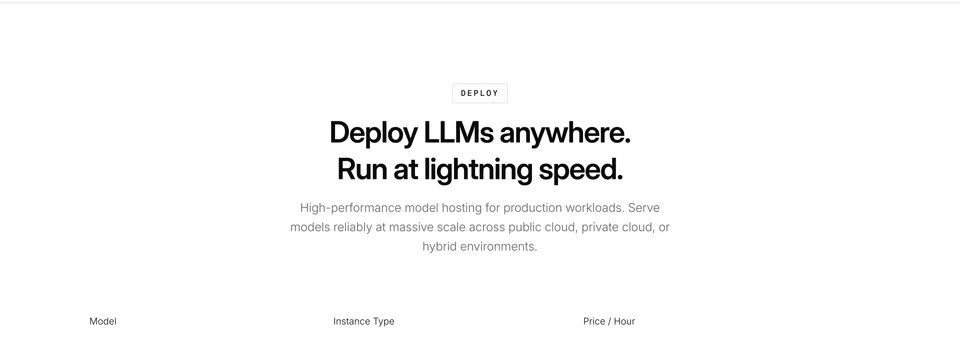
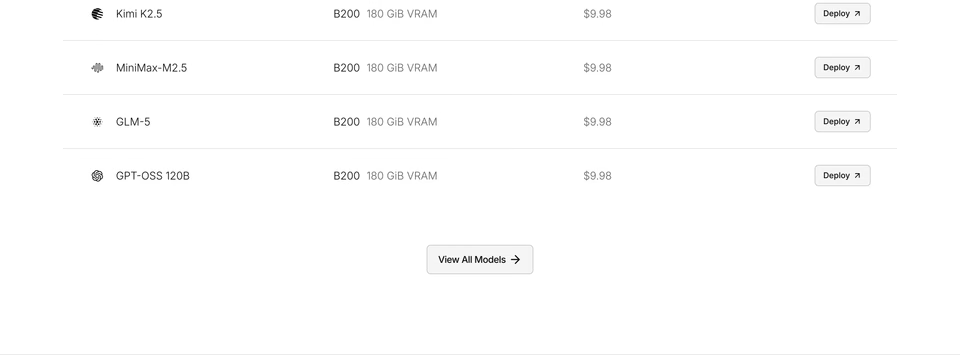
A borderless table, one model a row, its machine and its price an hour, and a small button on each.
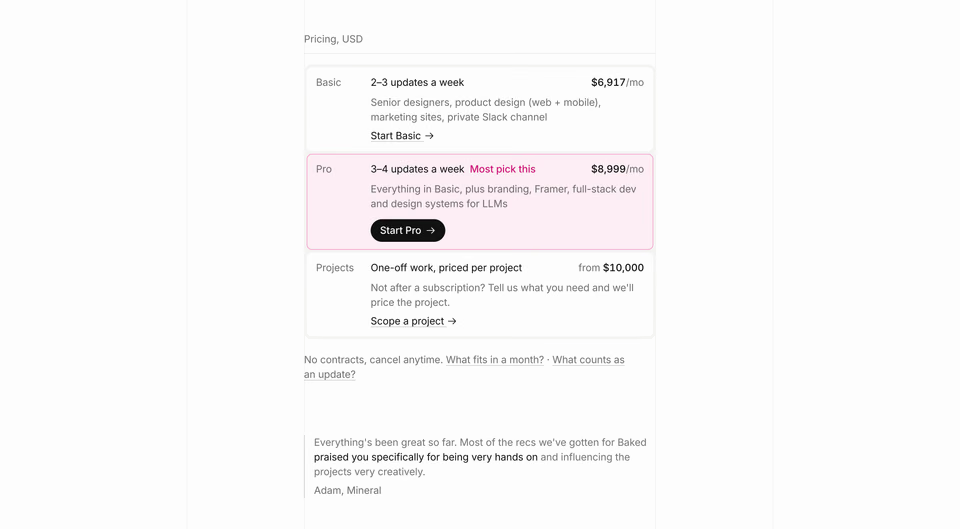
Three plans stacked as rows, the middle one tinted, each price on the right and a plain text link under it.
Design Details
Best for a free, hand-picked library you and your agent can search in plain words, with no account.
2,520 sections from 233 hand-picked websites, each cropped from a full-page capture: open one and you get the section, its page on desktop and mobile, a recording where there is one, and a link to the live site, with the fonts and colours measured from the site’s CSS and a note on why it was picked. Search reads a description, the component, layout, style, number of cards or movement, rather than one keyword. Everything is free with no account, paid for by sponsors, and its MCP server needs no sign-in: nine read-only tools, from searching sections to a page plan. Each site and section downloads as a DESIGN.md or SECTION.md for your tools. The catch: the smallest library here after UI Sections, and partner cards in the gallery.
- Picked
- 5Hand-picked; an editor reviews each site
- Size
- 22,520 sections
- Search
- 5Plain words: component, layout, style, movement
- In context
- 5Each section inside its full capture; a link to the site
- Take away
- 4A DESIGN.md or SECTION.md to hand your tools
- Free
- 5Free, no account
- Agents
- 5MCP, free, no sign-in
- Total
- 31of 35
A1
a1.gallery Its page on regards
Best for sections with their fonts and colours measured, free to browse.
3,968 sections from 1,265 sites, with 3,353 full-page captures, each section carrying its measured colours and font and a “View live” link. You search by words and filter by style, technology and colour. Browsing is free, every site and filter; Pro, $9 a month or $72 a year, adds full-page screenshots and more saves. Its MCP server is free with an account, 25 requests a day (Pro, 2,000). The catch: words and filters, not a description of a look.
- Picked
- 5Hand-picked, updated nearly every day
- Size
- 33,968 sections
- Search
- 4Words, with style, colour and font filters
- In context
- 4“View live” and its site’s page from every section
- Take away
- 4Measured colours and fonts with each section
- Free
- 5Browsing free, every site and filter
- Agents
- 5MCP free, 25 requests a day
- Total
- 30of 35
Arche
Best for landing pages, studios and portfolios, with their design systems and motion measured.
Over 550 landing pages, studio sites and personal portfolios, each picked by a person, none by an algorithm and none paid for, cut into 3,096 sections, with 528 design systems measured on the live pages. Every site has a preview of its whole page beside its sections, and a link to the live site; with a free account, sections filter by type, theme and motion, and on Pro by typeface and colour too. Its MCP server keeps 20 lookups a day on a free account; Pro, $7 a month or $40 a year, opens the rest, from design systems and motion to a page plan, and a Claude Code plugin adds three skills. The catch: on the site you filter rather than describe; reading a description is something its MCP server does for your agent.
- Picked
- 5Every site picked by a person, none paid for
- Size
- 33,096 sections
- Search
- 4Type, theme and motion; typeface and colour on Pro
- In context
- 5Each section on its site’s page, beside a preview of the whole
- Take away
- 4Design systems and motion measured; copy as an image
- Free
- 4Every section gallery with a free account
- Agents
- 5MCP free, 20 lookups a day
- Total
- 30of 35
Landingfolio
landingfolio.com Its page on regards
Best for SaaS sections with a free agent token, and code components to match.
4,652 section examples from 961 sites, mostly SaaS and product landing pages, each with its colours and a “Copy for AI” button, plus a separate library of 800+ copy-and-paste components for Tailwind, Webflow and Figma. Free shows the newest 40 of each kind; $49 a year, or $59 once, opens the rest. Its MCP server takes a token from a free account, 20 fetches a day (1,000 paid), and seven free skills come with it. The catch: a token to paste, and the code components are its own, not the sites’.
- Picked
- 5Curated by its team
- Size
- 34,652 sections
- Search
- 4Words, theme and style; colour on the paid plan
- In context
- 4A link back to the page it came from
- Take away
- 4“Copy for AI” with each section
- Free
- 3The newest 40 of each kind
- Agents
- 5MCP free, 20 fetches a day, with a token
- Total
- 28of 35
Land-book
land-book.com Its page on regards Alternatives
Best for the most sections, from a gallery of websites updated daily.
Land-book, which writes its name Landbook now, says it holds 20,000+ websites and 200,000+ sections cropped from them, every featured site reviewed by a human curator. You filter by colour, industry, platform, style and typography, copy to Figma, and download screenshots on Pro. Free gives limited sections and results with ads; Pro is $9 a month or $72 a year. The catch: no MCP server or API for your agent.
- Picked
- 5Every site reviewed by a human curator
- Size
- 5200,000+ sections
- Search
- 4Words, with colour, typography and style filters
- In context
- 4Its site’s page, and the live site
- Take away
- 5Copy to Figma; screenshot downloads on Pro
- Free
- 3Limited sections and results
- Agents
- 1No MCP or API listed
- Total
- 27of 35
Unsection
Best for a large section library, growing every week, with colour and text search.
5,584 website sections, plus a separate tab of designers’ concepts. Typed words are read as filters, “dark pricing table” becomes Pricing and Dark, and you can search the words inside screenshots, filter by 14 colours, style, layout and elements, and see each section’s colours and fonts. A button hands a section to your agent to recreate. Free shows the first 30 of a kind or a search, with ads; Pro is $9 a month or $99 once, and its MCP server, in beta, comes with both. The catch: no full page around a section, only the link to the site.
- Picked
- 4Curated; designers’ concepts in their own tab
- Size
- 45,584 sections
- Search
- 4Words read as filters; text in the shot; 14 colours
- In context
- 4A link to the live site; no full page
- Take away
- 4Hands a section to your agent, with colours and fonts
- Free
- 3The first 30 of a kind or a search
- Agents
- 4MCP on Pro, $9 a month, or $99 once
- Total
- 27of 35
Curated
curated.design Its page on regards
Best for sections with each site’s design system, for you and your agent.
3,389 sections from 2,930 hand-picked websites, reviewed one at a time, each linking out to the live page. Type what you’re making on its home page and it gathers the sections that page needs; search otherwise matches words. Pro, $9 a month or $84 a year, opens every section, the filters, a design.md of each site’s colours, type and spacing, and the MCP server. The catch: 16 sections are open on Free.
- Picked
- 52,930 hand-picked websites
- Size
- 33,389 sections
- Search
- 4Words, and a brief on its home page; filters on Pro
- In context
- 4Every section links out to the live site
- Take away
- 4A prompt per section; design.md on Pro
- Free
- 216 of 3,389 sections open
- Agents
- 4MCP on Pro, $9 a month
- Total
- 26of 35
Mobbin
mobbin.com Its page on regards Alternatives
Best for website sections beside the largest library of app screens, into Figma.
Mobbin added websites to its 600,000+ app screens in 2025: sections by kind, Features alone 3,715 of them, each
switching to its full page, searched in plain words or by the text inside them. Its deeper search and search by
image cover app screens only. References copy into Figma on eligible plans, and its MCP server comes with Pro, $10 a
month billed yearly. The catch: no search on Free, and no pick for looks stated. More in regards vs Mobbin.
- Picked
- 3No pick for looks stated
- Size
- 4No total; three of its kinds hold 7,000+
- Search
- 4Plain words and text in the shot; deep mode is apps only
- In context
- 4A switch from the section to its full page
- Take away
- 5Copy into Figma, on eligible plans
- Free
- 2No search on Free
- Agents
- 4MCP on Pro, $10 a month billed yearly
- Total
- 26of 35
One Page Love
onepagelove.com Its page on regards Alternatives
Best for free sections from one-page sites, with a free MCP server.
One-page websites hand-picked since 2008, with their sections filed by kind, Social Proof alone 751, each linking to the review of the site it came from. Free, with no account, and so is its MCP server during the beta, which filters by style, colour, category, platform and typeface. Its pages give different totals for the archive, so we quote neither. The catch: one-page sites, and no saving, downloads or exports that we found.
- Picked
- 5Hand-picked since 2008
- Size
- 3No total; its largest eight kinds hold 3,400+
- Search
- 3Words, with category, style, platform and tech filters
- In context
- 4Each section links to its site’s review, then the site
- Take away
- 1Look and follow the link
- Free
- 5Free, no account
- Agents
- 5MCP free during beta, no account
- Total
- 26of 35
save.design
Best for a workspace for your own references, with a large library searched by meaning.
A workspace for keeping references first, with a curated library attached: 1,200+ real websites and 11,000+ UI sections and interactions, many on video, each credited to its site, searched by meaning in plain words. The websites are free to browse with no account; the sections need a sign-in, and a plan for more than a preview: Basic is $3 a month, Individual $12 a month or $10 billed yearly. Its MCP server searches the sections by the look you describe, 150 calls a month before you pick a plan, and lays out boards on its canvas; a Chrome extension captures sections and records interactions from any site. The catch: what surrounds a section, its page and a link to the site, is behind the sign-in, so we couldn’t check it.
- Picked
- 4A curated library, updated daily
- Size
- 511,000+ sections and interactions
- Search
- 5Search by meaning, in plain words
- In context
- 2Credited to its site; the rest is behind a sign-in
- Take away
- 2Boards on a canvas, and a capture extension
- Free
- 2Sites free; sections need a plan past a preview
- Agents
- 5MCP, 150 calls a month before a plan
- Total
- 25of 35
UI Sections
Best for SaaS and startup sections, free, with nothing to sign up for.
1,908 sections from 285 SaaS and startup sites, one screenshot per section, sorted into 19 kinds and 22 styles, every one free with no account. Its search finds the names of kinds, styles, industries and companies, and a company’s page lists its sections in page order with a link to the site. Each section copies as a prompt for v0, Lovable, Cursor or Claude, with its colours as hex codes, or downloads as an image. The catch: a description of a look, like “dark hero with gradient”, found nothing when we tried it, and there’s no MCP server.
- Picked
- 4Curated; a person reviews each before it’s published
- Size
- 21,908 sections
- Search
- 3Names of kinds, styles, industries and companies
- In context
- 3The site’s other sections in order, then the site
- Take away
- 4Copy as a prompt, with its hex colours; downloads
- Free
- 5Free, no account
- Agents
- 2A prompt to copy; no MCP or API
- Total
- 23of 35
Web Anatomy
Best for SaaS sections scored for conversion, with an analysis of each.
Web Anatomy is now mainly a growth service, SEO and conversion work done for you, and its library is one of its free resources: 4,000+ sections, each with a conversion score and four lines of analysis, and whole pages of 40-odd kinds in a separate gallery. You filter by industry and by best practice, “social proof above the fold”, rather than search by words. A free account filters every collection and saves to boards; its MCP server comes with Pro, whose price isn’t public. The catch: no link from a section to its page or the live site, and its pages state its size several ways.
- Picked
- 5Hand-picked by its team
- Size
- 34,000+ scored sections
- Search
- 2Filters by industry and best practice; no text search
- In context
- 2Whole pages in a gallery apart; no link out
- Take away
- 3Downloads and boards; an analysis with each
- Free
- 4Every collection with a free account
- Agents
- 4MCP on Pro; free open skills
- Total
- 23of 35
SaaSFrame
saasframe.io Its page on regards
Best for SaaS pages and product screens, with Figma designs to paste.
SaaS websites and product screens, collected since 2020: 5,482 screens from 328 SaaS companies, and 1,014 website sections isolated from their pages, each leading to its full page and the company’s site. You search the words inside screenshots and filter by page type, pattern, industry and theme, and screens marked Figma paste in as editable layers on Pro, $18 a month or $180 a year. Free accounts see three results per filter. The catch: the fewest sections here, SaaS alone, and no MCP server.
- Picked
- 3SaaS companies; no pick stated
- Size
- 11,014 sections
- Search
- 3Text in the shot and filters, for screens
- In context
- 4“See the full page”, and the company’s site
- Take away
- 5Figma designs as editable layers, on Pro
- Free
- 2Three results per filter
- Agents
- 2Design prompts; no MCP
- Total
- 20of 35
What else is close?
Not scored, because each does a narrower job: Navbar Gallery (450+ navigation bars) and Footer Design, free libraries of one kind of section each, filtered by type and style; Details for motion and small interactions; Inspo AI and Lazyweb, which keep whole screens rather than sections; and galleries of whole sites, from SiteInspire to Lapa Ninja, compared in the inspiration roundup. For agents, every MCP server for design is in the best design MCP servers.
Where do I start?
With the part of the page you’re on. Our own picks of each kind, a few of the best rather than all of them, are on website sections: heroes, pricing, testimonials, footers and the rest. To search the whole library by describing what you want, start a search; the free plan searches all 3,060+ sections. To have your agent do it, connect it, and see website inspiration for Claude Code, Cursor and Codex for the setup in each.
Sources, read 9 November 2026: Design Details’ home, llms.txt and sponsorship; A1’s MCP and pricing; Landingfolio’s MCP and pricing; Unsection’s home, pricing, MCP and changelog; Land-book’s Pro and llms.txt; Curated’s sections, pricing and MCP; Mobbin’s pricing, changelog and sections; One Page Love’s sections, MCP and llms.txt; UI Sections’ home and about; Web Anatomy’s home, MCP and library; Arche’s home, pricing, MCP docs and llms.txt; save.design’s home, pricing, MCP and llms.txt; SaaSFrame’s home, pricing and llms.txt; Navbar Gallery’s and Footer Design’s home pages.
FAQ
Who offers a searchable library of individual website sections?
Several libraries cut real websites into their sections. regards searches them by look, in plain words, by you or your agent, from sites picked by hand for how they look. Design Details is free with no account and reads plain words too, and comes top by score at 31 of 35. A1 measures each section’s fonts and colours, Arche each site’s design system and motion; Land-book, save.design and Unsection hold the most sections; UI Sections is free for SaaS and startup sections; Web Anatomy scores sections for conversion; Curated, Landingfolio, Mobbin, One Page Love and SaaSFrame keep sections as well.
What is the best free website section library?
Design Details and One Page Love are free with no account, MCP servers included, and UI Sections is free with no account too. A1 is free to browse, with 25 agent requests a day on a free account, and Arche opens every section with a free account. regards searches its whole library on a free account, 10 searches a day. Unsection, Landingfolio and Land-book show part of theirs for free.
Which website section libraries work with AI agents?
Free: Design Details and One Page Love with no account; A1, Arche and Landingfolio with a free account, and save.design before you pick a plan; regards on every plan, Free included. On paid plans: Unsection, Curated, Web Anatomy and Mobbin. UI Sections copies a section as a prompt to paste instead, and Land-book and SaaSFrame list no MCP server.
What is the difference between a section library and a website gallery?
A gallery keeps whole websites; a section library cuts each page into its parts, the hero, the pricing table, the footer, and keeps each one as a result of its own. Use a section library when you are designing one part of a page and want to compare that part across many sites.